All insights

·

Daniel Asper
Meeting Notes Have Always Cost Advisors Attention. Continuum Dock Gives It Back.
Meeting notes have evolved from notepads to bots to botless capture. Dock keeps your meeting capture and consent controls always within reach.
From handwritten, to typed, to AI taking notes for you, meeting notes have evolved. Continuum Dock takes it one step further: making capture and client consent easier to manage, with your controls always within reach.
Your client is halfway through explaining why they want to take money out of their RRSP early. This is the part that matters: the reason behind the transaction, the part that never makes it into the CRM on its own. And you’ve just realized you never started capturing the meeting.
Every way advisors have taken notes has been an answer to that moment. Each one fixed something the last one got wrong. Each one still asked the advisor to give up a little attention to get the record. Continuum Dock is the next step in that line, and the first one that asks for almost nothing: your capture and consent controls, always within reach, so you never miss a meeting or a client’s consent.
The evolution of advisors taking notes
By hand: the client watches you write
Taking notes by hand means listening, deciding what matters, and writing it down at the same time. Your attention moves between the client and the page, and you can only capture so much while keeping up with the conversation. When (or if) you enter those notes into the CRM later, you’re relying on memory to fill in the context you couldn’t get down.
Typing made note taking a bit faster and easier to move into the CRM. But you were still dividing your attention between documenting what the client was saying, post-meeting follow-ups, and being present.
A bot on the call: the client meets the software first
Notetaker bots solved completeness. Invite one to Zoom or Teams and you get a full transcript and summary without writing a word.
But the bot is an attendee. Your client sees “Notetaker has joined the meeting” before they see you, and the opening minutes go to explaining what it is and where the recording ends up.
A notetaker bot also can’t sit in on a phone call or a meeting in your office, especially not if the client calls you or hosts the Zoom meeting. Most importantly, when something off-the-record comes up, there is no way to pause the note-taker.
Botless capture: nothing joins the call
Botless capture records from your own computer, so there’s no extra participant for your client to admit. Continuum turns the conversation into notes, tasks and a CRM update, and it works the same way for phone calls.
But one bit of friction was left. To log consent, start, pause, or stop transcribing – you still had to switch back to the Continuum app.That created unnecessary friction, usually right as the meeting started and your client was saying hello.
Meet, Dock: Never miss conversations or consent
Capture and consent, always within reach
Put the whole history in a line and it looks like this. The notepad cost eye contact. The bot cost the opening of the meeting. Botless capture cost a trip to another window. Dock asks for just a single click.
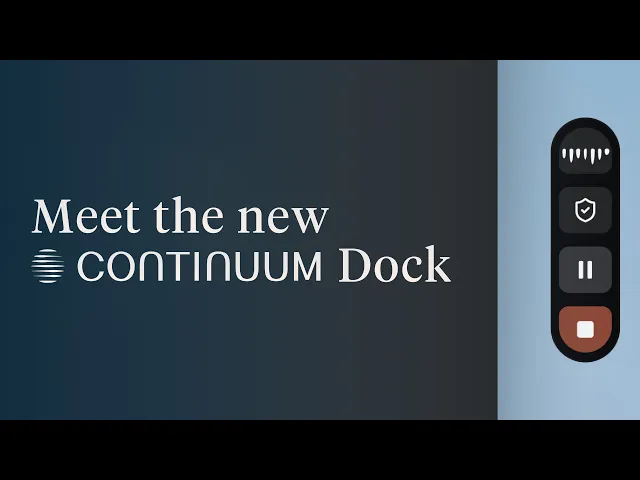
Dock makes your Continuum controls easy to reach, so you never miss transcribing a meeting or logging a client’s consent, and there’s no more switching back and forth to the Continuum app. It’s a small control that stays on your desktop while the Continuum desktop app runs. Hover over it to open it, and drag it wherever suits you. It remembers its spot on each display.
Join your meeting with less setup
Dock reminds you one minute before a meeting on your calendar. Click Join and you’re in the call and capturing, without opening the main Continuum window. If you’re already in the meeting, press Capture and pick it from the list.
Consent on record before the first word
If a client’s consent isn’t on record, Dock reminds you to ask, and you can log it before transcription begins. Copy the plain-language consent message into the meeting chat, tick who agreed, and each answer is saved on that client’s contact with the date. It’s visible on the meeting afterwards, for you and your compliance team.
Dock records the answer. Your firm’s process still decides how you ask.

Pause when it gets personal
When a client starts talking about a diagnosis or a family falling-out, or the conversation drifts into small talk, pause from Dock to keep it off the record and resume when you’re ready. Two waveforms show what Dock hears, your microphone and your computer’s audio separately. If one side stops coming through, Dock shows a warning and a way to fix it, so you’re not discovering a one-sided transcript after the client has left.

Get your notes the second you hit stop
Press Stop when the conversation ends. Continuum opens the meeting and generates your summary and suggested tasks automatically, ready for review as usual. CRM sync follows, and the client Page can start from there.
Dock works wherever the meeting is: Zoom, Microsoft Teams, Google Meet, Webex, phone calls and in person.
Where the attention goes now
Every stage of meeting notes traded a little of the client’s attention for a better record. Dock is the first version where the record doesn’t interrupt the conversation to get made. Capture the conversation, keep consent on record and get the follow-up moving, all in one simple workflow.
“If AI is a silver bullet, you should aim that bullet at making the client experience better.” — Alex Dashefsky, COO and Co-Founder, Continuum
Already on Continuum? Learn more about Dock in the help centre.
New to Continuum? Book your demo.
Daniel Asper
Daniel Asper is CEO and co-founder of Continuum.

