All insights

·

Daniel Asper
Connect More Than One Email and Calendar to Continuum
You can now connect multiple email and calendar accounts to a single Continuum login, with duplicates removed and per-account control over what each one contributes.
Plenty of advisors live in two inboxes. A dealer address and a firm address. A Microsoft calendar for the team and a Google calendar for the practice. Until now, Continuum asked you to choose one. You can now connect multiple email and calendar accounts to a single Continuum login.
What it does
Every connected calendar fills your Meetings page, so a client meeting booked on either calendar shows up with an alert a minute before it starts and is ready to capture. Email from every connected inbox appears alongside the right contacts, so client history is complete regardless of which address they wrote to.
Continuum removes duplicates across accounts. If the same invitation or message lands in both inboxes, it appears once.
You decide what each account contributes
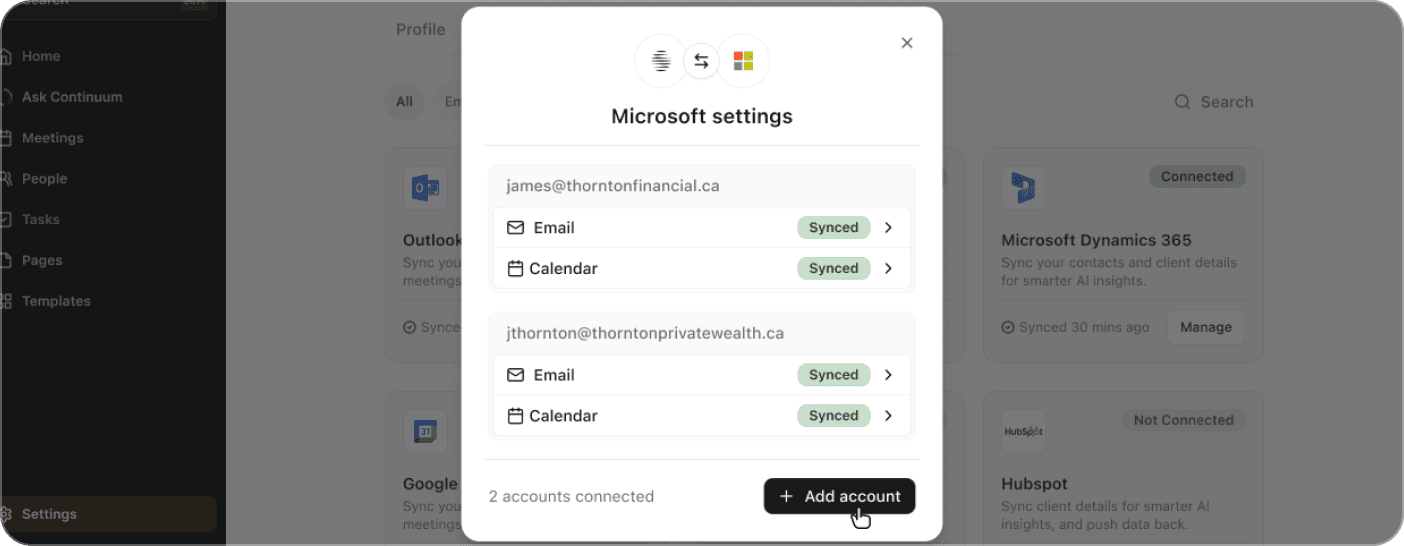
When you connect an account, you choose what it brings in: calendar only, email only, or both. That matters when one account is purely for scheduling, or when an inbox holds mail you do not want surfaced in client profiles. You can change the setting later from Settings, then Integrations, where connected accounts are listed with their sync status.
How to add an account
Open Settings, then Integrations. Under Email and Calendar, click Add account beside Google or Microsoft, sign in with the account you want to add, and approve the permissions. The new account appears in the list with Email and Calendar badges showing what it is syncing. Disconnecting one account leaves the others untouched.
Why it matters for the record
Compliance reviews are easier when one system holds the whole relationship. With both accounts connected, the meeting that was booked from your dealer calendar and the follow-up you sent from your firm address sit on the same client timeline, next to the transcript and the tasks that came out of it.
Open Settings, then Integrations, to add your second account.
Daniel Asper
Daniel Asper is CEO and co-founder of Continuum.